LOFTx Leasing Chatbot: Complete Feature Guide
LOFTx Editorial Team | 2026-11-16
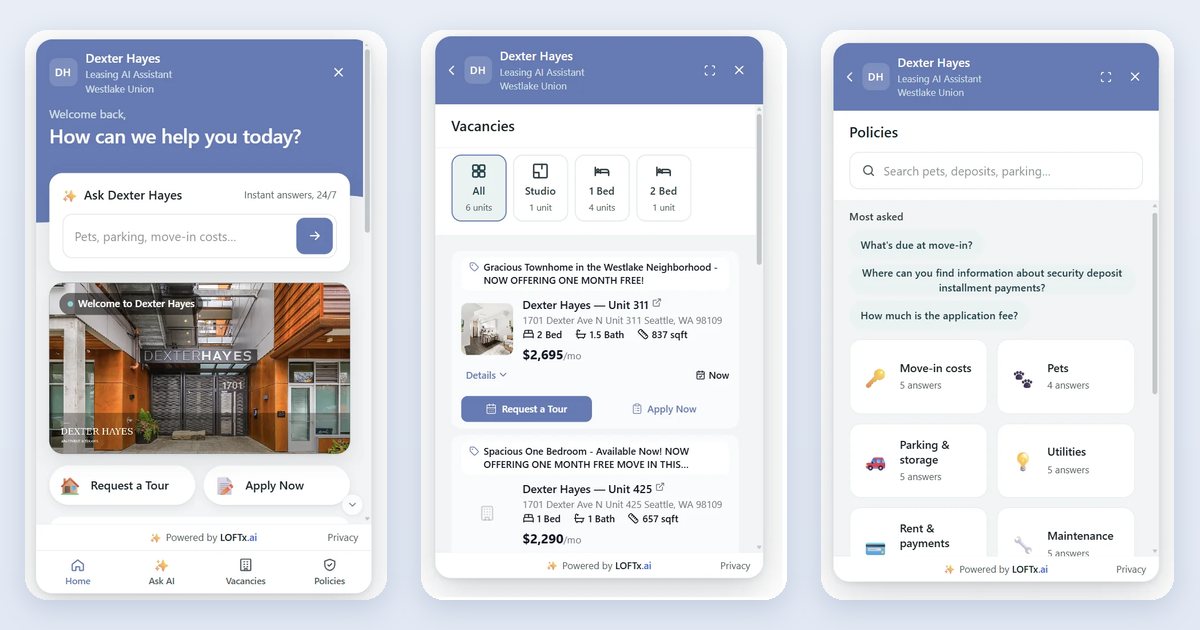
A renter visits your website after hours, asks about a two-bedroom apartment, checks the pet policy and wants to schedule a tour. LOFTx connects those steps in one conversation and gives your leasing team the context to continue when personal attention matters.
Lofti, our AI leasing assistant, brings property-specific answers, lead capture, tour booking and human handoff together. Our website Messenger gives renters a place to explore and ask questions. Leasing AI connects conversations across channels, and Agent Skills keeps follow-up moving from the first inquiry to the next leasing step.
Here is the complete feature guide to that connected experience.
1. Leasing conversations around the clock
Give renters a helpful response when they are ready to ask, including evenings, weekends and busy office hours. Lofti answers questions about the property and unit they are interested in, remembers the conversation context and helps them take the next step.
- Answer questions about floor plans, amenities, parking, pets, fees and application steps.
- Understand rental preferences such as bedroom count, budget and move-in timing.
- Handle follow-up questions without restarting the conversation.
- Connect renters with your team when they need a person.
2. Support for 100+ languages
Support renters in 100+ languages. LOFTx answers leasing questions, captures inquiries and guides prospects toward a tour in their preferred language.
Renters can engage with your properties more comfortably, while your team keeps the conversation connected to the same property information and leasing workflow.
See how LOFTx bridges the prospect and your team with 100+ languages.
3. A Messenger renters can browse or chat with
Our Messenger puts useful information alongside the conversation. Visitors can browse a vacancy, find an approved policy or ask Lofti a question without choosing between a traditional website and a chatbot.
| Area | What renters can do |
|---|---|
| Home | Explore welcome content, property information and shortcuts |
| Vacancies | Browse units, prices, specials and availability |
| Policies | Search or browse approved property answers |
| Ask AI | Ask questions and continue the conversation |
Make the Messenger your own with property branding, welcome messaging, suggested questions, video, amenities, office details and opening hours. Add shortcuts for tours, applications, pricing, specials, contact information and resident portals.
The mobile-friendly experience lets renters explore and act from their phones. See the Messenger feature walkthrough.
4. Native connections to your property management systems
LOFTx supports AppFolio, Yardi, Rent Manager, Rentvine, MRI, RealPage and Buildium, plus PMS platforms with an open API.
LOFTx connects your PMS data with leasing conversations, giving renters answers about properties, floor plans, pricing, availability and specials. Connected leasing calendars let prospects choose an available time and book a tour in the same conversation.
Explore our AppFolio integration, Rent Manager connection and Yardi guide.
5. Property knowledge controlled by your team
Your team knows the property. LOFTx puts that knowledge to work through your website, FAQs and approved custom content.
Use your knowledge base to explain pet policies, parking, amenities, move-in information and application steps. Maintain company-wide answers alongside property-specific details so the conversation stays relevant to the community a renter means.
Update the source information as your properties change. Your staff remains in control of the answers and the instructions that guide the assistant.
6. Lead capture with useful context
Turn an interested visitor into an inquiry your leasing team can act on. LOFTx gathers contact information and rental preferences within the conversation, connecting the lead to the property and the next requested action.
Capture:
- Contact details and communication preferences.
- Property or unit of interest.
- Bedroom preference, budget and move-in timing.
- Questions asked and information already shared.
- Tour interest and appointment context.
Use lead questionnaires to collect information consistently and make it available to your team. Rental-preference collection supports follow-up; application screening remains a separate process.
7. Guest-card inquiries from listing services
The broader Leasing AI offering can turn guest-card inquiries from internet listing services into leasing conversations.
Bring inquiries from Zillow, Apartments.com, Rent.com, Realtor.com and other listing services into the Prospect Inbox through your connected leasing inbox. Lofti connects the inquiry with its property or unit and begins the conversation, while your team works from the same lead context.
8. Tour booking with Google Calendar and Outlook
LOFTx connects natively to Google Calendar and Outlook, letting prospects book available tour times directly on your leasing team's calendars.
Offer open appointment times, record the booking and send confirmation without making the renter wait for a scheduling exchange. Portfolio calendars support agents covering multiple communities.
Support agent-led, virtual and self-guided showing schedules where your properties offer them. AppFolio customers can also direct renters to a unit's existing AppFolio showing page.
Read more about automated showing scheduling.
9. Applications connected to the right unit
Help ready-to-apply renters reach the appropriate application with Apply Now buttons and unit-specific destinations. Share application links in the conversation and use post-tour follow-up to encourage the next step.
The application remains connected to your leasing process, while LOFTx helps renters find their way to it.
10. Email, SMS, website chat and voice
Keep leasing conversations moving across the channels renters use. Our Leasing AI offering connects website chat, email, SMS and voice with the Prospect Inbox.
Lofti can answer property questions over the phone, check availability, arrange a tour and text the confirmation. Connect your leasing communication through integrations including Dialpad and RingCentral.
Your team can review the conversation history rather than reconstructing the inquiry from separate messages. Explore Leasing AI.
11. One shared Prospect Inbox
Give your staff a shared view of prospects and the next leasing step.
The Prospect Inbox brings together:
- Conversation history and property context.
- Internal notes and lead tags.
- Filters for inquiries, tours, applications and conversations needing attention.
- Text-delivery warnings.
- Call transcripts and summaries.
- Prospect, applicant and resident context across the portfolio.
Connected PMS records bring additional information, such as leases, ledgers and work orders, into the staff workflow. Mobile browser access lets agents review leads and conversations between tours.
12. Live human takeover
Your team can join a conversation when a renter needs personal attention. Lofti pauses while staff take over, keeping the existing context available so the renter does not have to start again.
Live takeover supports website chat, SMS and email conversations. The Needs you view helps your team find conversations requiring a person, while internal notes and tags support coordination.
See how human handoff works.
13. Follow-up that runs with Agent Skills
Keep the next step moving after the first conversation. Our Agent Skills respond to leasing events and follow up with prospects at the appropriate stage.
| Skill | What it helps your team do |
|---|---|
| Greeter | Start engagement with new inquiries |
| Tour Booker | Move an inquiry toward a scheduled visit |
| Tour Concierge | Share reminders and practical visit details |
| No-Show Recoverer | Offer another booking opportunity after a missed tour |
| Application Starter | Encourage the application step after a visit |
| Closer | Support follow-up later in the leasing journey |
| Long-Lead Nurturer | Stay connected with prospects planning a later move |
| Win-Back | Re-engage eligible prospects |
Edit the wording, timing and channels in plain English. Skills use property-time-zone quiet hours, message spacing, daily limits and automatic stop conditions, including applications, leases and opt-outs.
Review each run to see what triggered it, what happened, what was delivered and why it stopped. Explore Agent Skills.
14. Multiple properties and centralized leasing teams
Use LOFTx on an individual community website or across a company website serving many properties. Keep answers tied to the right building while bringing inquiries into a shared operating workflow.
Support property-specific knowledge, shared inboxes, portfolio calendars and routing across leasing teams. For single-family rentals, connect the conversation to the correct home, its information and its showing process.
Read our guide to leasing across multiple properties.
15. Reporting from the first interaction to the next action
See how renters use the Messenger and where conversations lead.
LOFTx reporting covers widget opens, conversations, leads, frequently asked questions, and tours and applications started from chat. Property-level and weekly views help teams identify recurring questions and opportunities to improve the experience.
Agent Skills reporting adds visibility into deliveries, replies, clicks and progression. Use those insights to improve property information, follow-up and staff handling.
16. Brand and workflow controls
Make LOFTx part of your property's experience. Control branding, welcome content, knowledge, tone, shortcuts, tour and application destinations, and staff handoff.
Set the instructions your team wants followed, including property-focused language and routes for sensitive questions. Opt-out handling and follow-up controls help keep communication aligned with the prospect's preferences.
For data handling and access controls, visit our security page and privacy policy.
17. Straightforward website installation
Add LOFTx to your website with a script tag, or use the embedded-frame option where appropriate. Choose a single-property or company-wide experience, connect your systems, prepare your knowledge and set up your actions.
Our rollout process brings the website conversation and staff workflow together: connect property information, connect leads and calendars, set tour and application destinations, and test the experience with your team.
See the website chatbot implementation guide.
See where LOFTx is installed
Our website installation references include Redside Partners, Walls Property Management, Dexter Hayes and The Grove Ballard. Explore the full installation reference list for more company, property and business websites.
See your leasing workflow with LOFTx
Bring your website, PMS and a typical renter inquiry. We will show how Lofti answers the question, captures the lead, books the tour and keeps your team involved.
Book a demo or explore our AI chatbot for property management companies.
Using AppFolio Core, Plus or Max?
See how LOFTx connects with every AppFolio plan, including vacancy updates, direct web guest cards, and showing and application synchronization.
Explore lessons from deploying leasing assistants and how to check vacancy data.