Automated Showing Scheduling for Property Managers
Narasimhan Vallur | 2026-11-10
Last updated: November 10, 2026
Automated showing scheduling lets renters book an apartment showing themselves, at any hour, on a time that's actually open on your leasing agents' calendars. Nobody on your team has to play phone tag. For property managers, it closes the gap between "I'd like to see it" and a confirmed appointment. With the right tool, it also handles what comes next:
- reminders and directions
- rebooking renters who miss their showing
- a nudge to apply after the tour
This guide explains how automated showing scheduling works, what AI apartment tour scheduling adds, and how LOFTx.ai books, confirms and follows up on every showing. It's written for property managers and leasing teams who want more showings on the calendar with less back-and-forth.
Why manual showing scheduling costs you leases
Scheduling showings by hand looks simple, until you count the ways it breaks:
- Phone tag. A renter asks for a time, an agent replies with options, the renter replies hours later, and the slot is gone.
- The after-hours gap. Renters ask at night and on weekends too. A showing request that waits until morning may be booked somewhere else by then.
- Calendars out of sync. Agents covering several properties get double-booked, or open slots never get offered.
- No-shows. Without a reminder, some renters forget. Without a follow-up, they're gone for good.
- Nothing after the tour. A great showing with no follow-up often ends with no application.
Automated showing scheduling addresses each of these, without adding work for your team.
How automated showing scheduling works
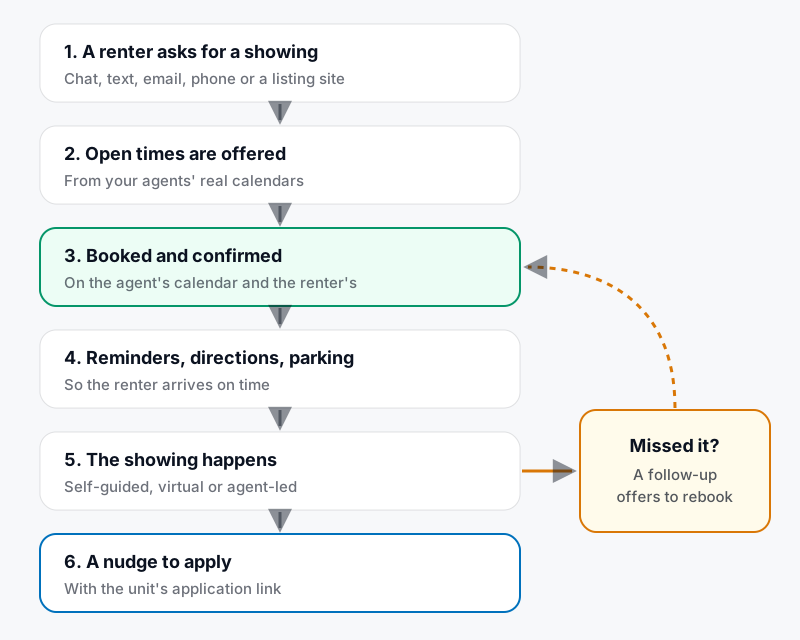
The life of an automatically scheduled showing.
- A renter asks, on any channel.
- Open times are offered from your agents' real calendars, so the renter only sees slots that are actually free.
- The showing is booked and confirmed. It lands on the agent's calendar and the renter's.
- Reminders follow, with directions and parking and access details.
- The showing happens: self-guided, virtual or agent-led.
- A follow-up nudges the renter to apply, with the unit's application. If they missed the showing, the follow-up offers to rebook instead.
AI apartment tour scheduling: booking inside the conversation
A booking link makes renters leave the conversation to find a time. AI apartment tour scheduling keeps them in it. The assistant answers the renter's questions and books the showing in the same thread:
- It offers specific open times: "I can show it Saturday at 11:00 AM or 1:30 PM."
- It answers questions that come up along the way, such as parking.
- It confirms the booking.
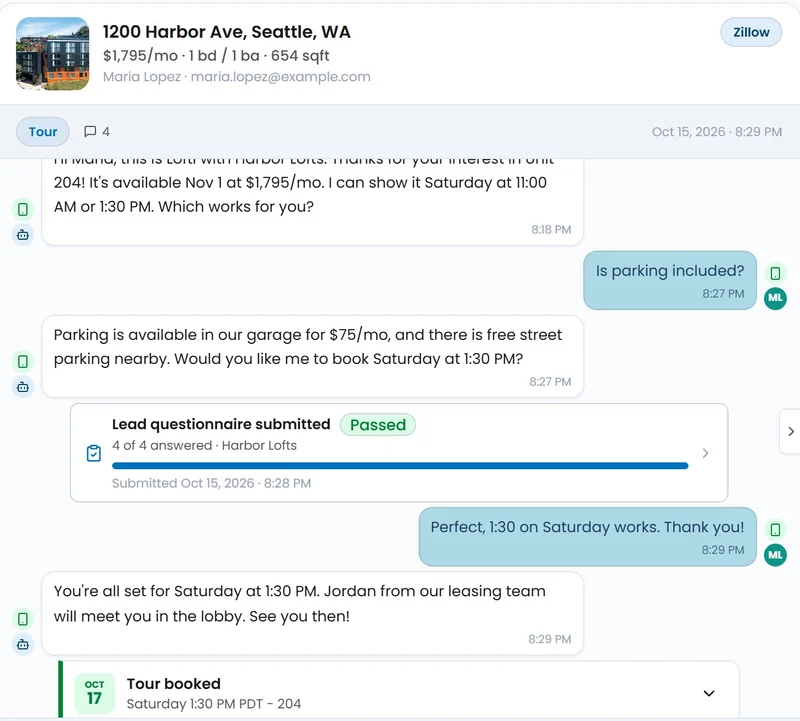
A Zillow lead asks about parking and books a Saturday showing in the same text thread. Shown with sample data.
Book showings from everywhere renters reach you
Automated showing scheduling only helps if renters can use it wherever they are:
- Your website. In the LOFTx.ai Messenger, every available unit on the Vacancies tab has its own Request a Tour button, and Home puts Request a Tour next to Apply Now. See what an apartment website chatbot should show.
- Listing sites. Guest cards from Zillow, Apartments.com, Rent.com, Realtor.com and other listing sites get a reply with open times.
- Text and email. Renters book by replying.
- Phone. Lofti answers your leasing line day or night, checks availability while the caller is talking, books the showing and texts the confirmation.
- Video. In Video Concierge, Book a Tour opens real calendar availability.
Using AppFolio? You can also hand renters off to the unit's own AppFolio showing page instead of booking in chat. See the AppFolio integration.
Every showing type, on the calendars you already use
- Self-guided, virtual or agent-led showings, whichever each property offers.
- Google Calendar or Outlook, connected for each leasing agent.
- Portfolio-wide calendars for agents who cover several properties, so they can be booked at any of their buildings.
Showings that actually happen
Booking is half the job. LOFTx.ai Agent Skills make sure showings happen and lead somewhere:
- Greeter: replies to every new inquiry in seconds and starts the conversation.
- Tour Booker: works to get a tour on the calendar soon after the inquiry.
- Tour Concierge: gets every prospect to the door on time, with parking and access details.
- No-Show Recoverer: rebooks prospects who missed their tour.
- Application Starter: turns a completed tour into a started application.
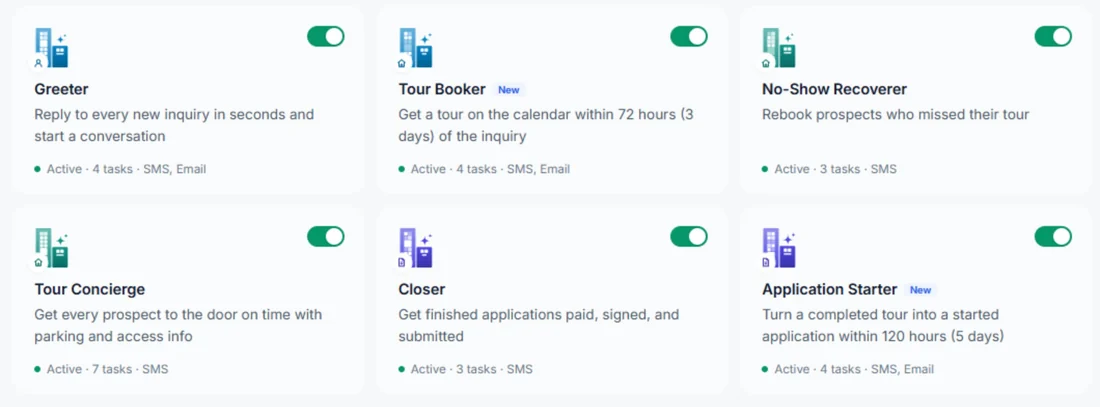
Tour skills in LOFTx.ai, each with its own channels and tasks.
Every skill follows quiet hours in each property's time zone, with spacing and daily limits. Each one stops on its own when the renter applies, signs, opts out or leases elsewhere. The wording, timing and channels are yours to edit, in plain English.
See which properties book showings
LOFTx.ai analytics follow the journey from widget opens to tours booked, by property and by week. You'll see:
- which properties turn conversations into showings
- the questions renters ask before they book
- how many tours and applications start from chat
Why property managers choose LOFTx.ai for showing scheduling
- Showings booked at any hour, from website chat, text, email, phone and listing sites.
- Real calendars: Google or Outlook, plus portfolio calendars for agents covering several buildings.
- Every showing type: self-guided, virtual and agent-led.
- Fewer no-shows: confirmations, reminders with directions and parking, and automatic rebooking.
- More applications: a follow-up after every completed tour.
- You stay in control: your team can take over any conversation live, and every booking is on the prospect's record.
- Works with your PMS: AppFolio, Yardi, Rent Manager, Rentvine, MRI, RealPage and Buildium, plus PMS platforms with an open API.
Start with a free month of the AI leasing assistant, with tour booking included. There's no credit card, nothing renews on its own, and you get a written quote before the month ends.
Frequently asked questions
Will automated showing scheduling double-book our agents?
No. It only offers times that are open on the agent's calendar, and the booked showing goes onto that calendar straight away.
Can renters book a showing at night or on weekends?
Yes. They can book any time, for any slot that's actually open, or for a self-guided showing where you offer one. See what a 24/7 AI leasing chatbot handles overnight.
What happens when a renter doesn't show up?
A follow-up offers to rebook, so your team doesn't have to chase them. It stops as soon as they rebook, apply or opt out.
Can our team still take over?
Yes. Anyone on your team can join a conversation live, and the AI pauses. The renter doesn't have to repeat themselves.
Fill your showing calendar this month
Spend less time coordinating appointments and more time hosting them. Book a demo to walk through booking, reminders and no-show follow-up with Lofti, and ask about the free month. For the conversation itself, see our apartment tour scheduling chatbot guide.