Apartment Tour Scheduling Chatbot: Book More Tours
Narasimhan Vallur | 2026-11-09

Last updated: November 10, 2026
An apartment tour scheduling chatbot answers a prospect's questions and books their tour on a time that's actually open on your leasing agent's calendar, without anyone on your team stepping in. The good ones do three more things around that booking:
- Capture the lead, whichever channel the inquiry came from.
- Answer the questions that come before a tour, at any hour.
- Follow up so the prospect actually shows up.
This guide goes feature by feature through how that works, what each feature should do, and what to check before you choose one. It's written for leasing managers, property managers and operations teams at apartment communities and property management companies.
How an apartment tour scheduling chatbot books a tour
A tour booked through chat should end the same way as one booked by your best leasing agent: a confirmed time, on the right calendar, with the prospect knowing where to go.
- The prospect asks. "Can I see the two-bedroom this Saturday?" can come in by website chat, text, email or phone.
- The chatbot offers open times. It reads availability from the leasing agents' real calendars, so it only offers times nobody else has taken. For agents who cover several properties, a portfolio-wide calendar lets prospects book them at any of those buildings.
- The prospect picks a time. The invite lands on the agent's calendar and the prospect's.
- Confirmation, reminders and directions follow. The prospect knows when to arrive, where to park and how to get in.
- Self-guided tours, where you offer them. The same flow can book a self-guided tour instead of an agent-led one.
On the phone, it works the same way: the assistant checks availability while the caller is still talking, books the time and texts the confirmation.
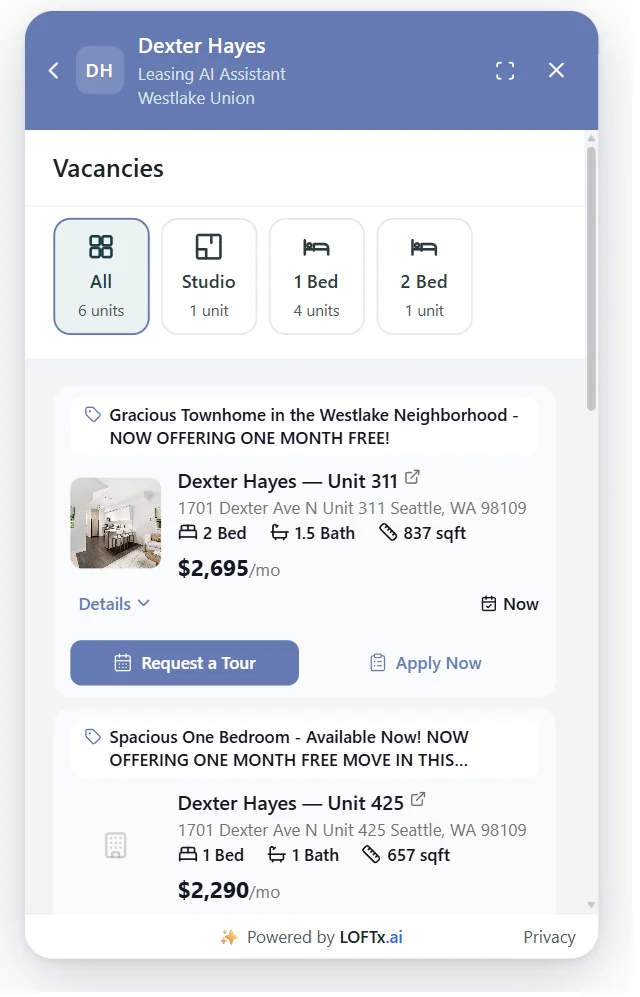
On a website chat, every available unit can carry its own Request a Tour button. The Messenger at Dexter Hayes, November 2026.
What "real availability" should mean
A booking link that lets prospects pick any time and leaves your team to sort it out isn't tour scheduling. Check that the chatbot:
- reads each agent's actual calendar
- never offers a time that's already taken
- puts the tour on the agent's calendar automatically, not in an email someone has to copy over
- sends the prospect a confirmation they can keep
Leasing lead capture: every inquiry becomes a lead
Before a tour, there's a lead. A leasing lead capture chatbot makes sure none slip through, wherever they start:
- Listing-site guest cards from Zillow, Apartments.com, Rent.com, Realtor.com and other listing sites, read straight from your leasing inbox.
- Website chat, where every conversation becomes a lead with the visitor's contact details and what they asked about.
- Texts, emails and phone calls to your leasing lines.
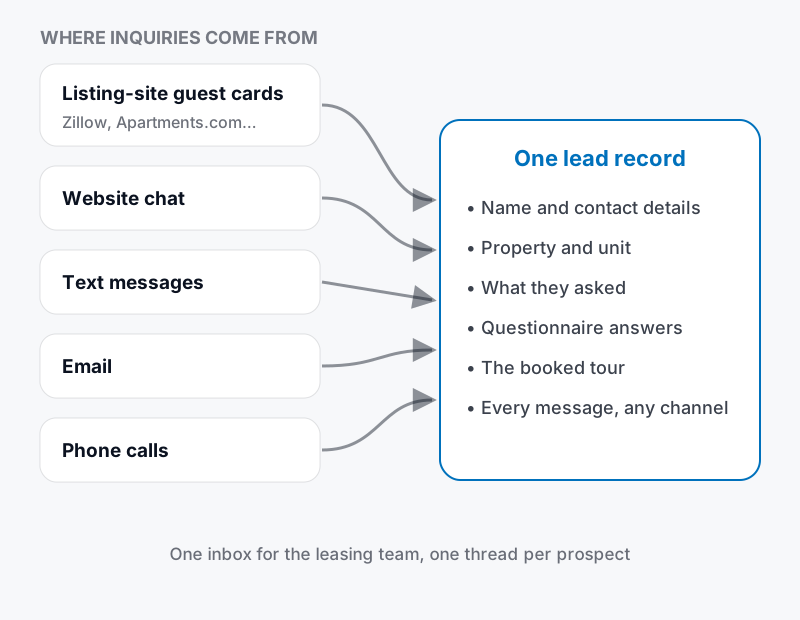
Every source becomes one lead record, with one thread per prospect.
What matters is that each inquiry becomes one record, not five. That record holds:
- the prospect's contact details
- the property and unit they asked about
- every message, on any channel
- their answers to your questions
- the booked tour
When your team picks it up, the whole story is already there.
Qualifying questions, the Fair Housing–safe way
Many teams ask a few questions before the tour, such as move-in date, number of occupants and pets, so agents spend time on prospects who are ready. Two rules keep this fair:
- Ask every prospect the same questions. A chatbot does this more consistently than people do.
- Ask about the home's needs, not about the people. "How many people will live in the apartment?" relates to occupancy. Questions about family make-up, age or anything similar don't belong in a lead questionnaire. Fair housing law prohibits statements that indicate a preference or limitation based on familial status and other protected characteristics (42 U.S.C. § 3604(c)).
Automated leasing inquiries: what gets answered without a person
Most pre-tour questions have a factual answer your team gives over and over:
- What's available, and what does it cost?
- Is there a move-in special?
- Do you allow pets? What are the fees?
- Is parking included?
- How do I apply?
An AI leasing assistant can answer these automatically, as long as the answers come from your property management system (for units, prices and specials) and a knowledge base your team controls (for policies and fees). Anything it doesn't know, or anything that needs approval or judgment, should go to a person. The same applies whenever a prospect asks for one.
A 24/7 leasing assistant: what happens overnight
Inquiries don't stop when the office closes. A 24/7 leasing assistant gives an after-hours prospect the same response a daytime one gets:
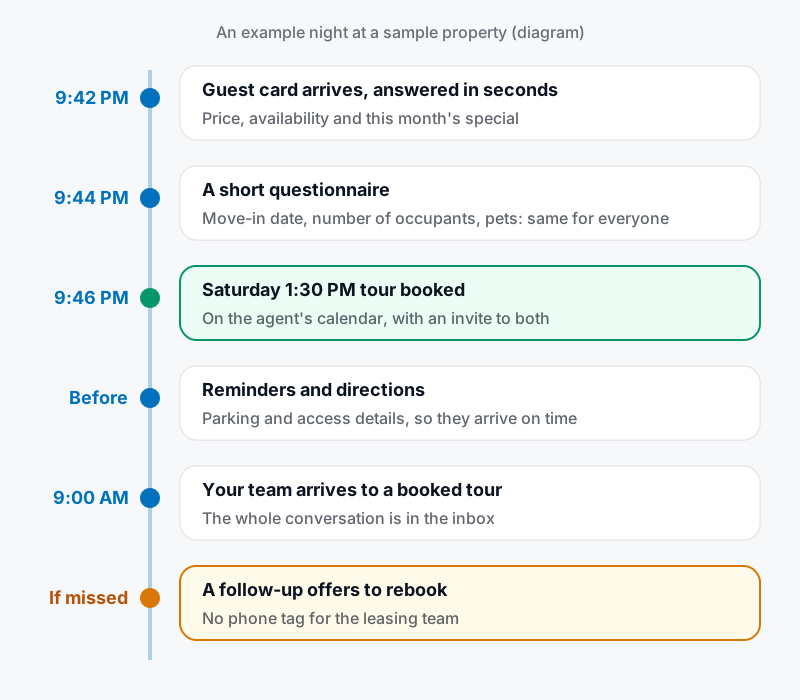
An example night at a sample property.
By the time your team arrives in the morning, the tour is on the calendar and the whole conversation is waiting in the inbox. Anything that needs a person is flagged.
Follow-up: getting prospects to the door
Booking the tour is half the job. The other half is making sure it happens, and that it leads somewhere:
- Before the tour: reminders with parking and access details, so the prospect arrives on time and knows where to go.
- If they miss it: a follow-up offers to rebook, instead of waiting for them to call.
- After the tour: a follow-up with the unit's application, while they're still interested.
- Limits: spacing between messages, daily caps, quiet hours in each property's time zone, and an immediate stop when the prospect applies, signs, opts out or leases elsewhere.
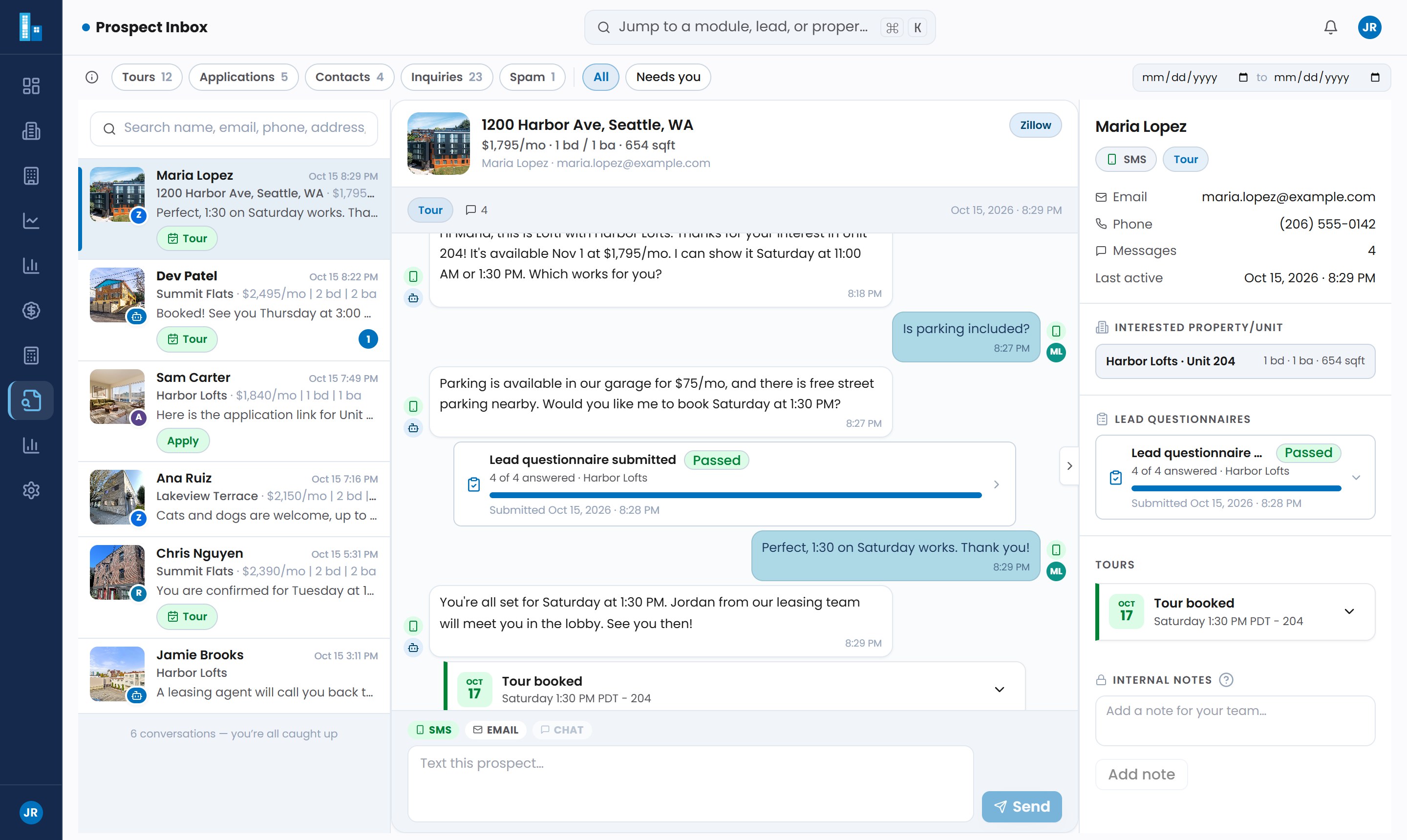
A booked tour and a passed questionnaire in one prospect's thread. Shown with sample data.
Feature checklist for a tour scheduling chatbot
| Feature | Why it matters | Question to ask the vendor |
|---|---|---|
| Real calendar booking | Prevents double-booking and manual copying | Does it read and write each agent's calendar? |
| Portfolio calendars | Agents covering several buildings stay bookable | Can one agent's calendar serve several properties? |
| Confirmations and reminders | Prospects show up, on time | What does the prospect receive, and when? |
| Self-guided tours | Tours outside staffed hours | Can it book self-guided tours where we offer them? |
| Every lead source | No inquiry left in an inbox | Does it read listing-site guest cards automatically? |
| One record per prospect | No duplicate follow-up | Do chat, text, email and calls join one thread? |
| Answers from live data | No offering units that are gone | Where do prices and availability come from? |
| Human handoff | Exceptions go to people | How does my team take over a conversation? |
| No-show and post-tour follow-up | Turns tours into applications | What happens after a missed or completed tour? |
| Opt-outs and quiet hours | Respectful outreach | Is STOP honored everywhere? Are there quiet hours? |
How LOFTx.ai handles tour scheduling
Lofti, the LOFTx.ai AI leasing assistant, replies in seconds, 24/7, by email, SMS, web chat and voice:
- Lead capture: guest cards from Zillow, Apartments.com, Rent.com, Realtor.com and other listing sites, website chats, texts, emails and calls all land in one Prospect Inbox, with one record per prospect.
- Qualifying: lead questionnaires ask every prospect the same questions before the tour.
- Tours: booked on times that are really open on your agents' Google Calendars, including portfolio-wide calendars and self-guided tours where you offer them. Reminders and directions are sent.
- Follow-up: Agent Skills handle confirmations, no-show rebooking and post-tour follow-up, with built-in guardrails.
- Your website: the website chat shows units and books tours without leaving your site.
Setup is three steps:
- Connect your PMS. It's read-only to start.
- Forward your leasing inbox or listing-site guest cards, and connect your agents' Google Calendars.
- Point your phone system at Lofti if you want it to answer calls.
Frequently asked questions
Will the chatbot double-book our agents?
It shouldn't. A proper tour scheduling chatbot only offers times that are open on the agent's calendar, and puts the booked tour on that calendar right away.
Which calendars does LOFTx.ai connect to?
LOFTx.ai connects your leasing agents' Google Calendars, including portfolio-wide calendars for agents who cover several properties. If your team uses a different calendar, ask us during the demo.
What happens if a prospect misses the tour?
A follow-up offers to rebook, so your team doesn't have to chase them. Follow-ups stop on their own once the prospect reaches the goal, such as rebooking or applying, or as soon as they opt out.
Can it handle tour requests after hours?
Yes. That's when a 24/7 leasing assistant matters most. Overnight inquiries get answered and booked, and your team starts the day with the tours already on the calendar. See after-hours leasing.
See your tours booked automatically
Bring the questions renters ask before they tour. Book a demo to see Lofti answer those questions and move the conversation to an available appointment. For reminders and no-show follow-up, read our automated showing scheduling guide.