AppFolio Chatbot Integration: Setup and Tour Flow
Narasimhan Vallur | 2026-11-09
Last updated: November 16, 2026
An AppFolio chatbot integration connects your AI leasing assistant to the property management system you already use, so its answers about units, prices and availability come from AppFolio instead of a list someone has to keep updated. A good integration does more than read units. With AppFolio it can also:
- turn AppFolio guest-card emails into leads
- send prospects to each unit's own AppFolio tour and application pages, if that's how you want to work
This guide is for property managers and leasing teams on AppFolio or Rent Manager, the two systems it covers in detail. LOFTx.ai supports AppFolio, Yardi, Rent Manager, Rentvine, MRI, RealPage and Buildium, plus PMS platforms with an open API. It explains what connects, what stays in your PMS, how tours and applications can run, and how to add the chat to your website.
What a PMS integration should give your chatbot
Whatever your system, these are the basics a leasing chatbot needs from it:
- Properties and units, so it knows what you manage and can answer about the right building.
- Prices, specials and availability, so it never offers a unit that's already leased.
- Context for your team, such as leases, ledgers and work orders, so agents don't switch systems when a conversation needs a person.
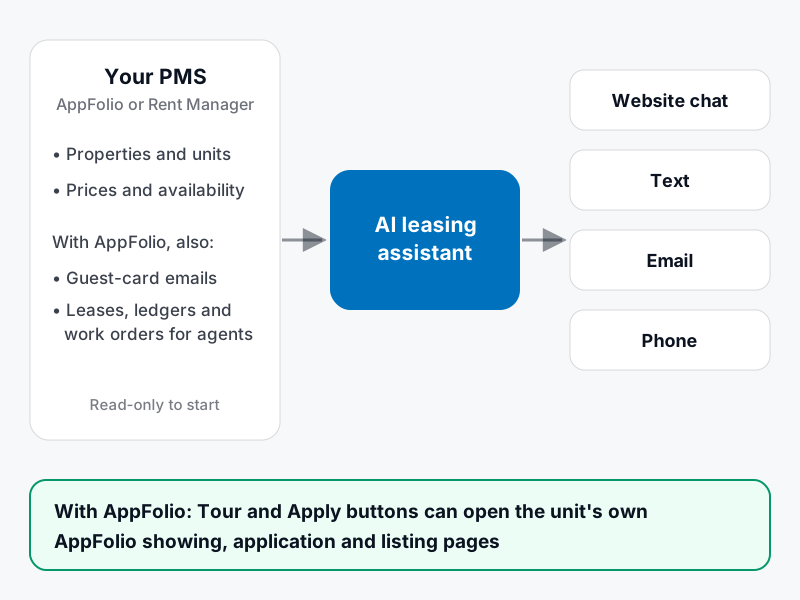
What your PMS supplies, and where the assistant uses it.
LOFTx connects website conversations with your leasing workflow. For AppFolio, web guest cards land directly in AppFolio, and showings and applications sync across Core, Plus, Max and other plans. Explore AppFolio plan support.
AppFolio chatbot integration: what connects
LOFTx integrates natively with AppFolio across plans, connecting:
- Properties, units, prices and availability. Lofti answers "What two-bedrooms do you have under $2,000?" from your AppFolio data.
- Guest-card emails. AppFolio's guest-card notification emails become leads in the Prospect Inbox, and Lofti replies. Emails that only claim to come from AppFolio, and fail sender checks, are rejected, so forged emails can't create guest cards.
- Records for your team. Agents see residents' leases, ledgers and work orders alongside the conversation, without switching systems.
Tours and applications: in chat, or handed off to AppFolio
AppFolio customers can choose how the Request a Tour and Apply Now buttons behave:
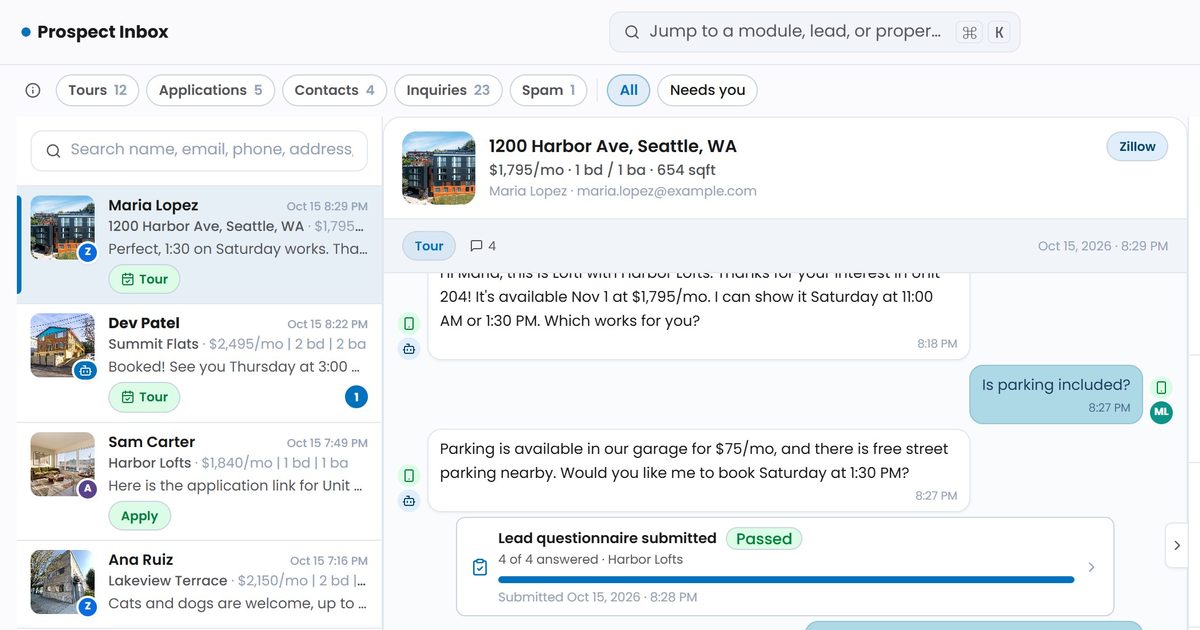
- Book in chat. The prospect picks an open time on your leasing agents' calendars, gets a confirmation and reminders, and the lead and conversation land in the Prospect Inbox.
- Hand off to AppFolio. The prospect picks a unit, and the chat opens that unit's own AppFolio showing or application page. AppFolio captures their details, just as it does on your listings today.
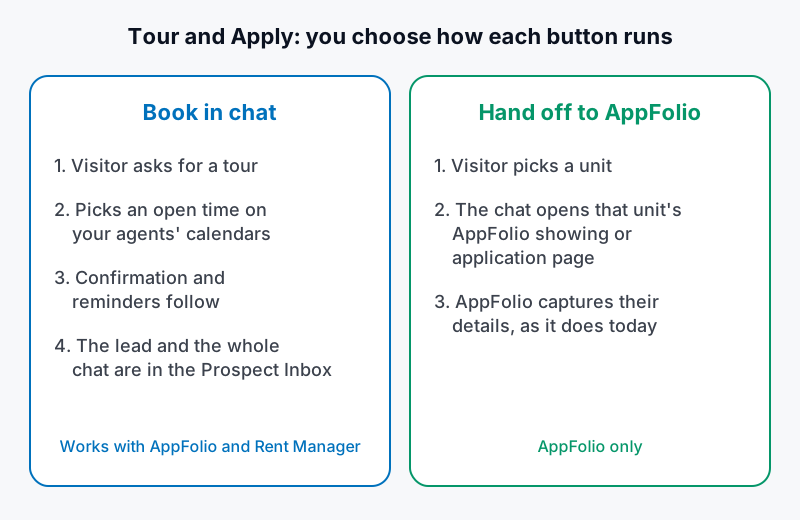
You choose how each button runs. The hand-off option is for AppFolio.
Either way, unit cards in the chat can link to the unit's AppFolio listing page. Texts include the same tour, application and listing links, so a prospect who moves from chat to text gets the same links.
Rent Manager chatbot integration: what connects
LOFTx.ai is part of the Rent Manager Partner Network. For Rent Manager customers, LOFTx.ai connects with Rent Manager API credentials and syncs:
- Properties and units, prices and availability, so Lofti answers from your Rent Manager data.
Tours run in chat: prospects book open times on your agents' calendars, and leads land in the Prospect Inbox. Listing-site guest cards reach Lofti through your leasing inbox, the same way they do for any LOFTx.ai customer.
Also integrates with many more PMSs
LOFTx.ai supports AppFolio, Yardi, Rent Manager, Rentvine, MRI, RealPage and Buildium, plus PMS platforms with an open API. Available fields, synchronization and actions depend on the system, permissions and configured workflow. Tell us your system on the demo form and we'll confirm how it connects.
Adding a chatbot to your AppFolio or Rent Manager website
The website chat installs with one script tag, either for the whole site or one per property. A few practical notes:
- Check your website builder. If your website is built by your PMS's website service or another site builder, confirm it lets you add a custom script to every page. If it only allows an embedded frame, there's an iframe version of the chat. We help with this during onboarding.
- Choose the scope. A single-property site gets that property's chat. A company site can cover every property, with a "which property?" step when it matters. See multifamily website chatbot for a portfolio.
- Set up the buttons. Tour, pricing, apply, contact and FAQ buttons each run the way you configure them, and buttons you haven't set up don't appear.
Setup, step by step
- Connect your PMS. Set up your AppFolio or Rent Manager connection with our team.
- Connect leads and calendars. Forward your leasing inbox or listing-site guest cards, and connect your agents' Google Calendars.
- Choose how Tour and Apply run. For AppFolio, choose between booking in chat and handing off to AppFolio.
- Add the chat to your website with the script tag.
- Review, then go live. We set up the answers with your team and test them together. You choose the properties, channels and follow-up to turn on, and when.
What to check in any AppFolio chatbot integration
| Question | Why it matters |
|---|---|
| Does it read units, prices and availability from AppFolio directly? | No manual lists that go stale |
| Are AppFolio guest-card emails turned into leads automatically? | Listing-site inquiries don't sit unanswered |
| Can Tour and Apply open the unit's own AppFolio pages, or book in chat? | Fits how your team already works |
| Which records and leasing activities are connected? | Clear ownership of inventory, guest cards, showings and applications |
| Do agents see leases, ledgers and work orders beside the chat? | No switching systems mid-conversation |
| Does it reject forged guest-card emails? | Spoofed emails can't create fake leads |
Frequently asked questions
Which property management systems does the LOFTx.ai chatbot support?
For leasing chat: AppFolio, Yardi, Rent Manager, Rentvine, MRI, RealPage and Buildium, plus PMS platforms with an open API. Tell us yours on the demo form and we'll confirm how it connects.
Will the chatbot change anything in our PMS?
For AppFolio, web guest cards are delivered directly into AppFolio, and showings and applications sync across all plans. Vacancies sync daily on Core and instantly on other plans. Your team can manage the leasing workflow in LOFTx or AppFolio.
Do we have to use AppFolio's tour and application pages?
No. With AppFolio, you can book tours in chat on your agents' calendars, or hand the prospect to the unit's AppFolio showing and application pages. With Rent Manager, tours are booked in chat.
Can we use it on a website our PMS hosts?
Usually, if the site lets you add a custom script or an embedded frame. Check with your website provider. We help with the setup during onboarding.
See it connected to your PMS
Review the Leasing AI product for the channels that use your connected property information.
Bring your PMS name and the way you book tours today. Book a demo to confirm data access, guest-card handling and the booking flow for your setup. See AI leasing assistant pricing for the questions to ask about costs.
Plan the rollout and channel tests
Use the PMC website chatbot implementation guide to prepare data and acceptance tests. For channel-specific checks, read website chat, SMS and voice workflows.