Multifamily Website Chatbot for Portfolio Leasing
Narasimhan Vallur | 2026-11-09

Last updated: November 13, 2026
A multifamily website chatbot on a company website has a harder job than one on a single community's site. Visitors arrive at the company's site, not a building's. They may know the neighborhood they want but not the building. They ask some questions that apply to every property, like how to apply, and others that apply to only one, like whether there's bike storage.
A good portfolio chat answers company-wide questions once, keeps building-specific answers tied to their building, and asks "which property?" only when the answer depends on it. This guide shows how the Messenger, LOFTx.ai's tabbed website chat, does that on a company website, using Redside Partners and its properties across Greater Seattle as the example.
The portfolio website problem
A single-property website has one answer to "Is there parking?". A company website with buildings from Ballard to Tacoma has dozens. A chatbot that doesn't account for that fails in one of two ways:
- It answers for everything at once. The visitor asked one question and gets a paragraph per building.
- It guesses. It picks a building the visitor never mentioned, and the answer is confidently wrong.
At the same time, many questions really are the same everywhere: how to apply, what screening looks at, how to reach the office. Making a visitor choose a building before answering those just slows them down.
How a multifamily website chatbot should split company and building answers
The rule that works is to split the content in two:
- Shared by every building: company policies (applying, screening, rent payments), the leasing office, and the chat itself, with one assistant and one inbox.
- Specific to each building: its available units, its amenities, and any answer that only makes sense for one property.
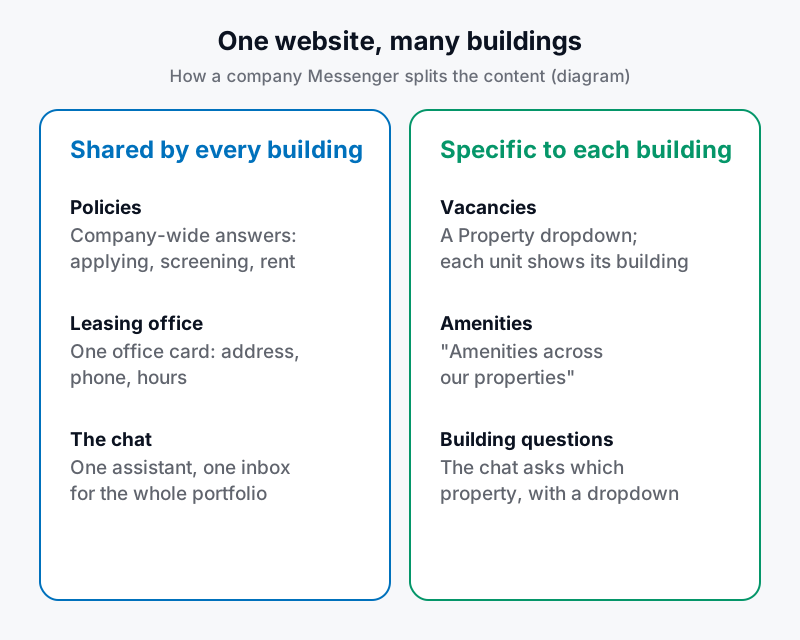
What a company website's chat shares, and what it keeps per building.
The Messenger on a company website
The Messenger puts four tabs in one chat window: Home, Ask AI, Vacancies and Policies. On a website that covers several properties, each tab follows the split above:
- Home shows the company's name and logo, one leasing office card, and the buildings' amenities under "Amenities across our properties". Its shortcuts section is called "Explore all properties".
- Vacancies lists live units from every building, with a Property dropdown: "All properties" first, then each property. Each unit shows which building it's in, with its own Request a Tour and Apply Now buttons.
- Policies shows the company's approved answers, grouped into categories such as Move-in costs, Pets, Parking & storage, and Legal & privacy. Answers that belong to one building stay with that building, so a visitor never reads one property's rule as company policy.
- Ask AI is the full chat, with unit cards, tour and contact forms, and live agent takeover. When a question needs one building, it asks which one.
Installing it takes one script tag. Embedded with only the organization's ID, the chatbot covers every property, so the company website needs nothing per building.
Asking "which property?" without making visitors type it
When a visitor on a multi-property website asks about one property's features without naming a building, the chat asks which property they mean, and restates what they asked. Examples include:
- "Do you have a pool?"
- "Tell me about the amenities."
- "Is there bike storage?"
For bike storage, it asks: "Which property's bike storage would you like to know about?"
Under that question is a dropdown of every property in the chat. There is no "All properties" option, because the answer needs one building. The visitor picks a property, the chat answers for that building, and the dropdown locks. If the visitor would rather type the name, that works too. This works in the classic chat and in the Messenger.
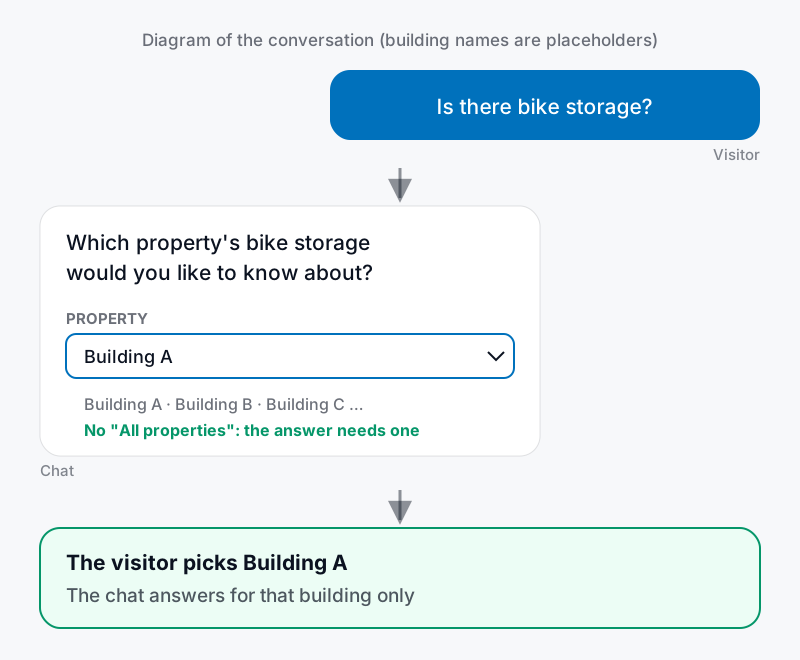
The chat asks for a building only when the answer depends on one. The building names are placeholders.
Company-wide questions skip this step. "How do I apply?" gets the company's answer straight away, whichever building the visitor has in mind.
Worked example: Redside Partners across Greater Seattle
Redside Partners is a Seattle-based property management firm. Since 2002 it has managed multifamily and commercial buildings across the Puget Sound area, and it says it manages about 5,000 apartments in the Seattle area (About Redside). The neighborhood filter on its managed properties page gives a sense of the spread:
- Seattle neighborhoods such as Ballard, Capitol Hill, Fremont, Queen Anne, South Lake Union and West Seattle
- Kirkland, Redmond, Renton, Shoreline, Tacoma and Woodinville
Its homepage features properties from AV Lofts in Tacoma's Hilltop neighborhood to Phinney Flats on Phinney Ridge. Its website, redsidepartners.com, embeds the LOFTx.ai chat with the organization's ID only, which is the setup that covers every property.
Here's how Redside's public information maps onto a company Messenger:
Leasing office (Home). One office card for the company: 1620 Broadway, Suite 201, Seattle, open 9:00am to 5:00pm Monday through Friday, with a separate after-hours emergency number. The office card's settings have fields for both numbers, so visitors find the emergency line without hunting through the website.
Policies. Redside's application rules are company-wide, so they belong here, written once (Redside FAQ):
- Applications are made online.
- Screening considers credit, rental history and income.
- Co-signers may be required.
- Reusable screening reports aren't accepted.
Those answers fit the Move-in costs and Legal & privacy categories, which cover applications and screening criteria.
Vacancies. A visitor who wants "something in Fremont" opens Vacancies, picks a building from the Property dropdown or stays on All properties, and sees each unit labeled with its building.
Ask AI. Building questions get a building first. "Is there bike storage?" gets "Which property's bike storage…?" and the property dropdown. Questions such as "Do you have anything under $2,000 with two bedrooms?" get matching units from the live inventory, each labeled with its building.
Setting up a company Messenger
- Choose the scope. A company website can have its own Messenger settings, or use the organization's default settings, which cover every property. Each property's or website's own settings, where it has them, stay separate.
- Review the company-wide policy answers. The AI drafts them from your company documents, and uses a policy for every building only when all the buildings agree. Your team approves them, and nothing waiting for review is shown to visitors.
- Keep building-specific answers on their building. A building's pet rules or parking prices belong to that building, so they never appear as company policy.
- Fill in the one leasing office card. Address, phone, after-hours phone, email, hours and arrival notes.
- Check the amenities. "Amenities across our properties" comes from the buildings' amenities, so it's only as good as each building's list.
- Preview, then switch. The settings page shows a live preview of unsaved changes. The embed script on the website doesn't change.
For a building that has its own website, see our single-property walkthrough.
Why it helps visitors and centralized leasing teams
- Visitors aren't forced to know the building. They can browse every building's units, or narrow down to one, before they ever type.
- Company rules are consistent. One approved answer about applications serves every visitor, so different buildings can't give different versions.
- No wrong-building answers. The chat asks instead of guessing, and the dropdown makes answering one tap.
- Centralized leasing has one inbox. Every conversation, tour and application from the company website lands in one shared Prospect Inbox, labeled with its property. Tours can go on portfolio-wide calendars for agents who cover every building. See Leasing AI.
- You can see results by property. The chat analytics break conversations, leads, top questions and tours down by property and by week.
Does AI chat for apartment websites help SEO?
Not on its own, and no chat tool can promise rankings. Google says its ranking systems are designed to prioritize helpful, reliable information created to benefit people (Google Search Central). For a portfolio, that content is your website's pages. What a multifamily website chatbot changes is what visitors do once they arrive. A few practical points:
- Give every building its own page. Searchers look for a building or a neighborhood, not a management company. Redside, for example, has a page per property, such as AV Lofts. The chat should send visitors toward those pages and repeat their facts, not replace them.
- Use chat questions by property to plan content. If visitors keep asking the chat about parking at one building, that building's page should answer it.
- Watch page speed. Google recommends that site owners achieve good Core Web Vitals, its measures of loading, responsiveness and visual stability (Google Search Central). Test key pages before and after adding any third-party script, including chat.
- Judge chat by tours, not rankings. On a company website, the measure is how many visits become conversations, leads and tours, by property.
Frequently asked questions
Do visitors have to pick a property before they can chat?
No. Company-wide questions are answered straight away. The chat asks for a property only when the answer depends on one building, and the visitor can pick from a dropdown or type the name.
Why does Vacancies offer "All properties" when the chat dropdown doesn't?
Browsing units across every building is useful, so Vacancies starts there. An answer about bike storage or a pool needs one building, so the chat's dropdown lists only individual properties.
Can a building's own website use a different chat?
Yes. Each property, website and the organization default can have their own settings, so a building's own site can show its single-property Messenger or the classic chat, while the company website shows the company Messenger.
Does each building need its own embed code on the company website?
No. One script tag with the organization's ID covers every property.
See it on your portfolio
For the team's daily work, see the multifamily leasing workflow. For routine questions, the inquiry-reduction guide explains how to decide which answers belong on the site.
Help renters find the right building without losing the conversation. Book a demo to explore property filters, shared policies and building-specific answers in the Messenger. For a single community, see the apartment website chatbot checklist.