How to Check Whether a Leasing Chatbot Uses Current Vacancy Data
LOFTx Editorial Team | 2026-11-16
A chatbot can give a polished answer using an old rent. It can also show an attractive unit card for a home that is no longer available. The wording alone will not tell you whether the information is current.
When evaluating a leasing chatbot, pick a real unit and follow its information from your property management system to the website conversation. You do not need a technical demonstration. You need to see whether the renter gets the right facts and the right next step.
Start with one unit you know
Choose a unit your team can identify easily. Record its property, unit number, bedroom count, rent, availability date and any current special. Then ask the chatbot about that exact home.
Compare the answer with the source record. Check the vacancy card as well as the conversation: the two should describe the same home. If the assistant offers a different unit, it should make that change clear.
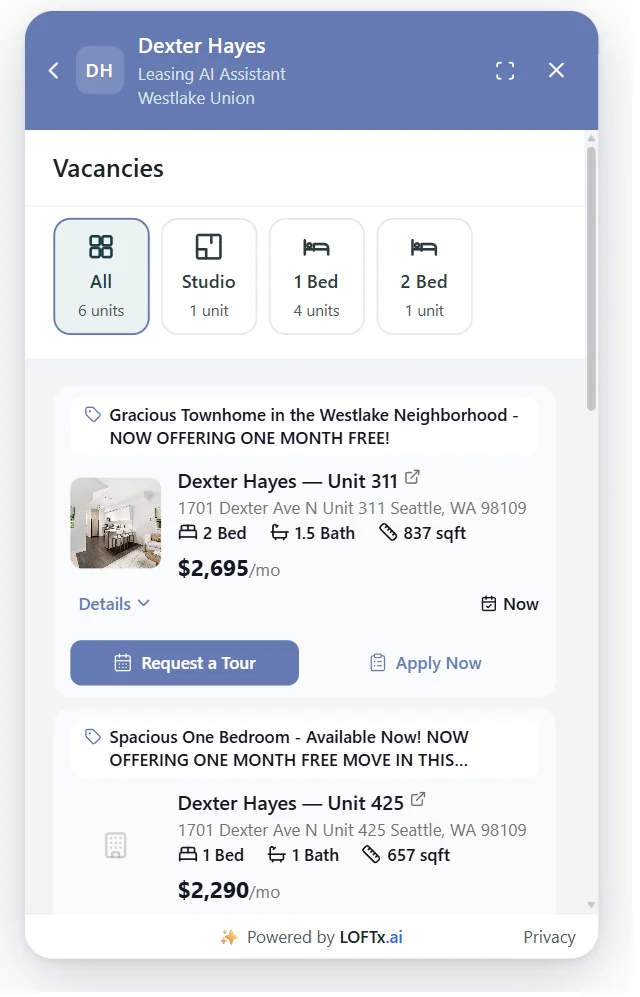
Existing LOFTx Messenger screenshot. The displayed unit details are a snapshot, not a current rental offer.
Ask how often vacancies update
"Connected to the PMS" tells you where information comes from. It does not, by itself, tell you when an update becomes visible.
For AppFolio, LOFTx provides daily vacancy sync on Core and instant vacancy sync on Plus, Max and other plans. Web guest cards, showings and applications connect directly to AppFolio across all plans. See our AppFolio plan guide.
Use the actual refresh cadence when evaluating an answer. A daily update and an instant update should not be measured against the same expectation.
Test a change, not just an initial answer
Ask for a demonstration using a test unit or an approved update. Do not change a real advertised rent simply to test a chatbot.
| Check | What to compare |
|---|---|
| Rent changes | Source rent, vacancy-card rent and conversational answer |
| Availability changes | Source status and whether the home is still offered |
| Move-in date changes | The date in the source and the date communicated to the renter |
| A special ends | Whether the expired offer remains in the card or answer |
| No matching homes exist | Whether the assistant explains the result instead of inventing an option |
Record when the source changed and when the website reflected it. That produces a useful observation rather than a general impression that the chatbot feels up to date.
Check the property context
On a portfolio website, freshness is only half the question. The information must also belong to the correct building.
Ask about two communities with different policies or similar unit names. Check that the assistant keeps their rents, specials and availability separate. When the visitor has not identified a property, asking a short clarifying question is better than guessing.
Follow the tour and application buttons
A correct answer can still lead to the wrong destination. Open the tour and application actions associated with the unit and check the property and unit they reference.
Also distinguish apartment availability from appointment availability. The vacancy source tells the renter about a home; Google Calendar or Outlook supplies the available tour times in LOFTx's native calendar workflow.
Confirm the result of the action. Did the renter request a visit, select a time or receive a confirmed appointment? Those are different stages.
Keep the check repeatable
Write down the unit, source values, question, answer and observation time. Repeat the same check after a meaningful change to inventory or the connection. Include one unavailable unit and one question with no matching result.
Our aim is straightforward: connect your property information to a useful leasing conversation. A side-by-side check makes that visible and gives your team a concrete way to assess the result.
Explore LOFTx's PMS connections or book a demo with a property and a few units you know well.