What Deploying AI Leasing Assistants Taught Us About Property Websites
LOFTx Editorial Team | 2026-11-16
Putting an AI assistant on a property website is not just a matter of adding a chat bubble. The experience has to work for a renter who knows exactly which unit they want, someone still comparing communities and someone who would rather talk to the leasing office.
LOFTx website chat is installed on company websites including Walls Property Management, Redside Partners, MainGate Management and Isola Communities WA. Our installation reference list also includes property websites such as Dexter Hayes, The Grove Ballard and AV Lofts. The lessons below are reflected in our deployment guides and the Messenger itself. They are product-design observations, not a claim that every customer saw the same results.
1. Do not make visitors ask for everything
Some renters want a conversation. Others want to see the available homes or find the pet policy and move on.
That is why our Messenger puts Home, Vacancies, Policies and Ask AI alongside one another. The question box is there, but it is not the only way to get information. A visitor can browse a unit and then ask a more specific question about it.
This changes the job of the opening screen. It should help a person recognize what they can do, rather than leave them staring at an empty message box.
2. Approved answers need to be easy to find
A good policy answer is useful both in a conversation and as something a visitor can browse. The Policies screen groups approved information into recognizable topics and lets renters search in their own words.
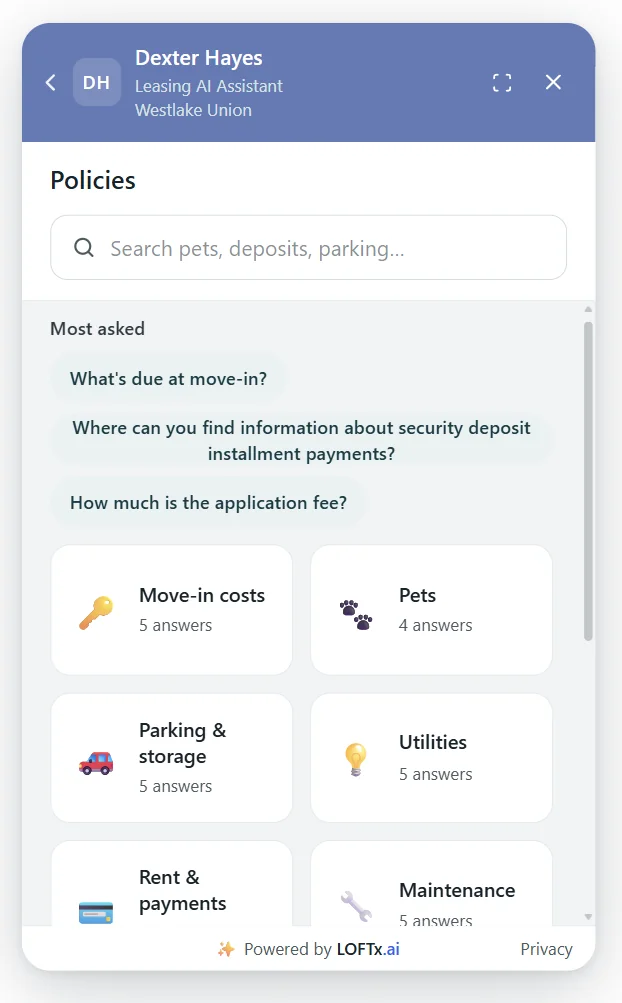
Existing LOFTx product screenshot at Dexter Hayes. Categories make approved property information available without starting a chat.
The practical lesson is to give each answer an owner. If a parking policy changes, someone needs to update the information the assistant uses. Clear ownership is part of the product's usefulness after launch.
3. A company website needs property context
A company-wide answer and a building-specific answer are different things. Application instructions may apply across the portfolio; parking arrangements may not.
Our portfolio workflow separates those kinds of information. When a visitor's question depends on a building, Lofti establishes which property they mean. A short clarification can prevent a much longer correction later.
This matters just as much for scattered single-family homes. The address is part of the question, not an incidental detail.
4. The next step matters as much as the answer
"You can book a tour" is less useful than a working route to an available appointment. A vacancy card becomes more useful when its tour and application actions lead to the right home.
LOFTx connects natively to Google Calendar and Outlook, and our Messenger places tour and application actions next to the property information. The experience should make the outcome clear: a request has been captured, an appointment has been booked or the visitor has moved to the application.
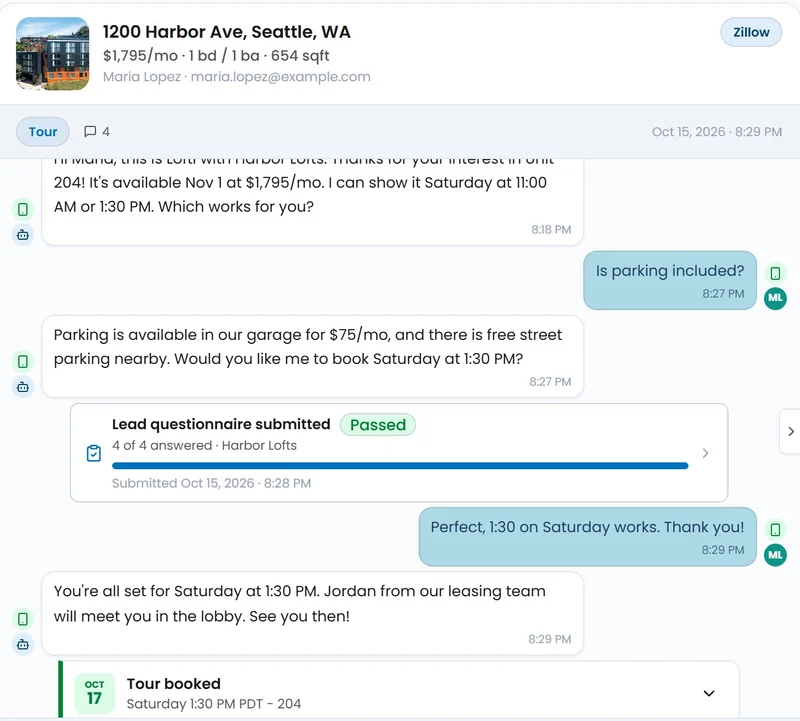
LOFTx product interface with sample data. This illustrates the workflow; it is not a customer transcript or performance result.
5. A handoff should preserve the conversation
When a renter asks for a person, the useful information is already in the thread: the property, the question and the steps taken so far.
Our live takeover lets staff continue with that context while Lofti pauses. Internal notes and lead tags help the team coordinate. The operating question is who owns the next reply, especially when the request arrives outside office hours.
A shared inbox needs a team process behind it. Decide who checks it and how unresolved inquiries move to the right person.
6. Renters should not need to learn leasing terminology
People ask about the total cost to move in, when they can get the keys or whether their pet is allowed. The answer should meet that question directly.
LOFTx supports 100+ languages so prospects can ask in the language they are comfortable using. Plain explanations matter within each language too. Familiar wording and a clear next action help connect the renter's question with the property manager's information.
7. Review the whole journey after launch
A conversation count does not tell you whether the renter reached the right destination. Review a few complete journeys: the initial question, the answer, the action and the staff follow-up.
Use reporting to find recurring questions, then read the conversations behind them. If people repeatedly ask for a detail your website already contains, it may need to be easier to find. If an inquiry reaches the wrong team, fix the ownership or routing rather than rewriting a greeting.
That is the work that keeps a leasing assistant useful: maintaining the facts, making actions clear and giving the team a practical way to continue.
Explore our complete feature guide, read the implementation guide, or book a demo around your website's actual renter journey.