Why Apartment Website Visitors Don't Book Tours
Narasimhan Vallur | 2026-11-10
Last updated: November 13, 2026
Apartment website conversion stalls for a handful of reasons, and most of them have nothing to do with the apartments. Visitors arrive interested. They found you on a listing site or in search. Then they leave without booking a tour, usually because one of these happened:
- they couldn't see what was available
- they couldn't get a quick answer
- they couldn't find the tour button
This article walks through eight of those leaks. Each one comes with its fix, shown with numbered callouts on a real website chat: the LOFTx.ai Messenger at Dexter Hayes in Seattle. It ends with a conversion audit you can run on your own site today. It's written for property managers and marketing teams who get website traffic, but not enough tours.
The eight leaks in apartment website conversion
1. No way to ask a quick question
A visitor wants to know one thing, usually pets, parking or move-in costs, and the only option is a contact form. Fix: put an ask box up front that answers instantly, at any hour. At Dexter Hayes, Home opens with "Ask Dexter Hayes · Instant answers, 24/7", with a hint of what to ask.
2. Nothing that shows the place
Listing photos got them to your site. Now they want to feel the building. Fix: a short welcome video, right on the first screen of the chat.
3. The tour button is buried
If booking a tour takes four clicks, many visitors won't make it. Fix: put Request a Tour, next to Apply Now, where the visitor lands.
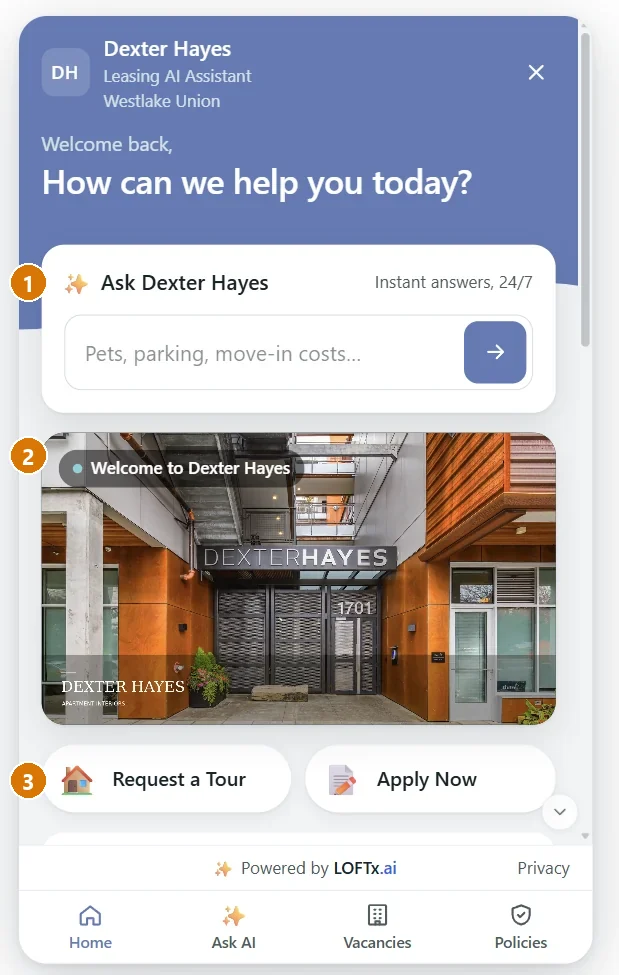
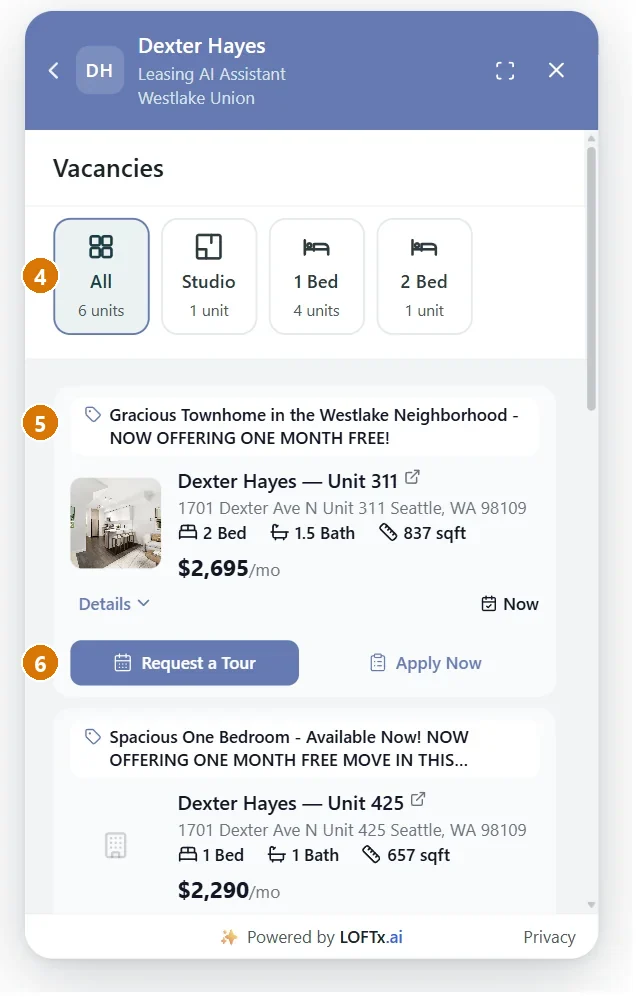
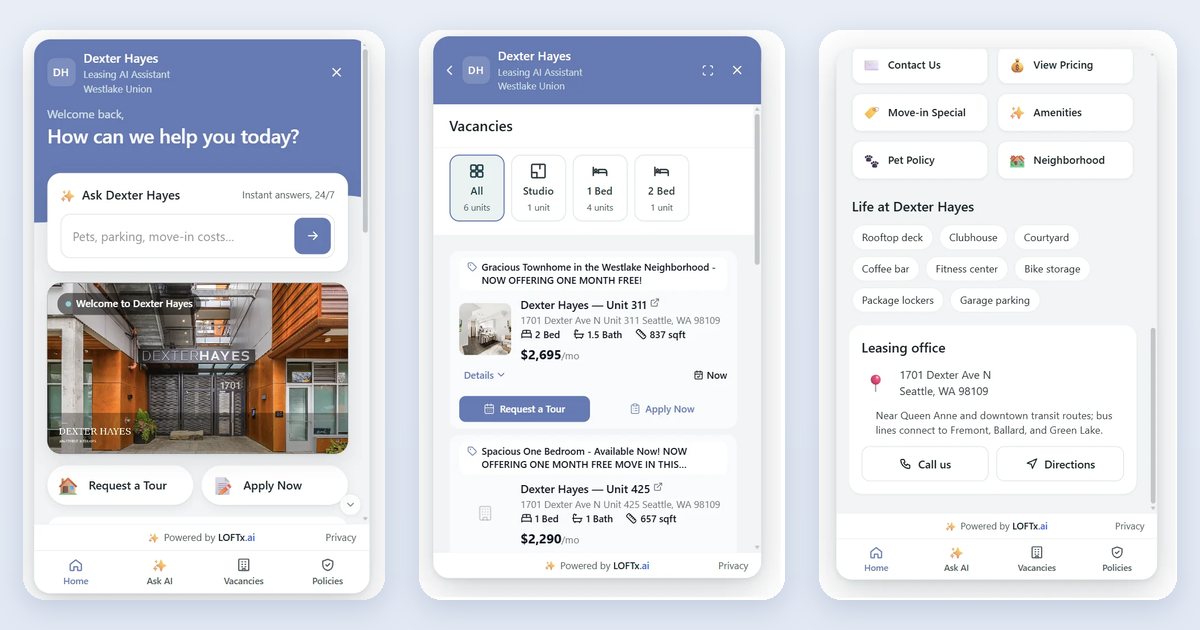
Callouts 1–6 on the Home and Vacancies tabs. Shown on the Messenger at Dexter Hayes, November 2026. Units, prices and specials change.
4. Visitors can't find the right unit fast
A long list of units with no filter sends visitors back to the listing site. Fix: a floor-plan filter that shows how many units each plan has (All, Studio, 1 Bed, 2 Bed), using live data from your property management system.
5. Specials are hidden
A move-in special is your best reason to book now, but it often sits in a banner nobody reads. Fix: put the special on the unit itself, in the unit's headline, where the decision is made.
6. The tour button isn't next to the unit
The moment a visitor sees the right unit is the moment to book. Fix: a Request a Tour button on every unit card, booking a time that's actually open on your agents' calendar.
7. Visitors can't reach a person
Some visitors are ready to talk. If the phone number is buried in the footer, they leave. Fix: a leasing office card with Call us and Directions buttons, one tap away. Behind the chat, your team can take over any conversation live.
8. Policies are hidden in a PDF
Pet fees, deposits, parking and utilities decide whether a visitor books. Fix: a policies screen people can search ("dog deposit" finds pet fees), with only answers your team has approved.
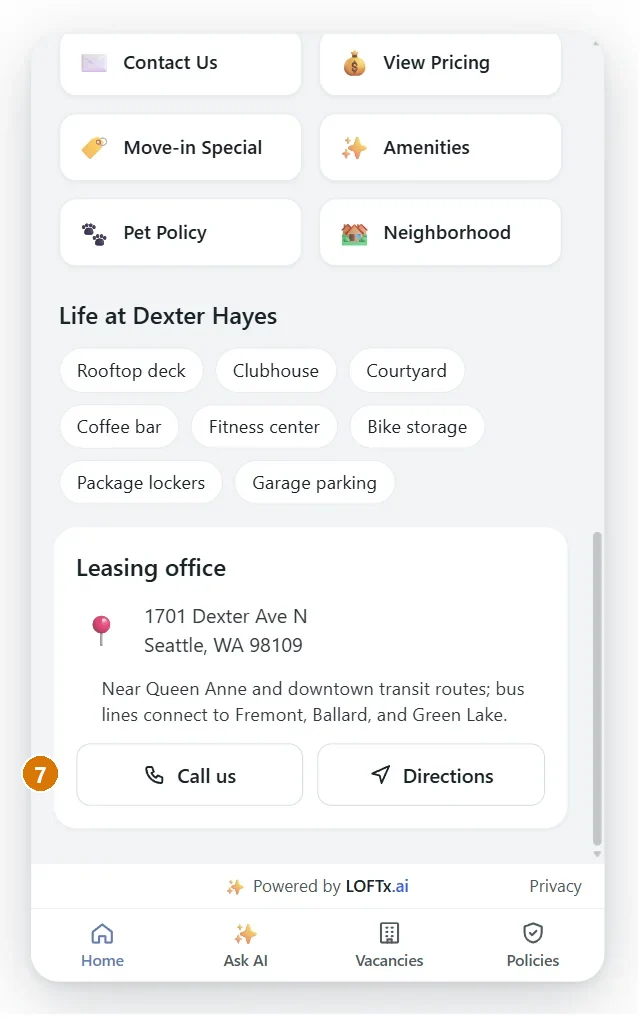
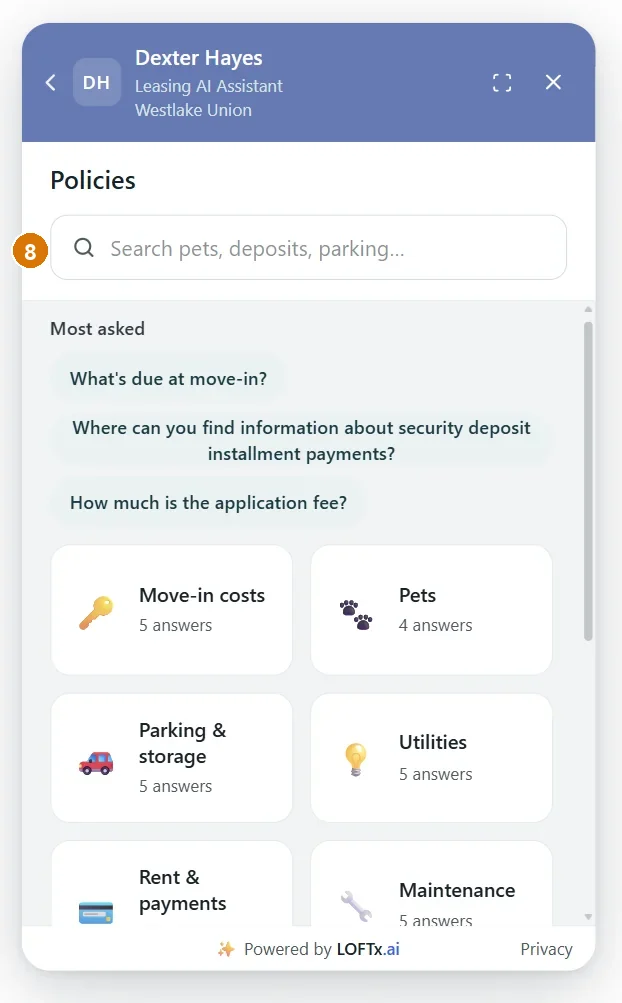
Callouts 7 and 8: a person one tap away, and policies people can search. Shown on the Messenger at Dexter Hayes, November 2026. Units, prices and specials change.
Run an apartment website conversion audit today
Open your community's website on your phone and check each point:
| Check | Pass? |
|---|---|
| Can I ask a question and get an answer in seconds, at night? | |
| Is there something that shows the building on the first screen? | |
| Is "Request a Tour" visible without scrolling? | |
| Can I filter units by floor plan, with live prices? | |
| Are current specials shown on the units themselves? | |
| Can I book a tour right from the unit I like? | |
| Can I call or get directions in one tap? | |
| Can I search the pet, parking and deposit policies? |
Every "no" is a leak. Start with the ones a visitor hits first.
Measure the fix
Apartment website conversion is a funnel. Measure each step, by property and by week:
- website chat opens
- conversations
- leads
- tours booked
- applications started
LOFTx.ai analytics follow that journey from widget opens to tours booked, and show the top questions visitors ask. The top questions are often the next thing to fix on the website itself.
Why LOFTx.ai for apartment website conversion
- Every leak above, fixed in one widget: ask box, welcome video, tour and apply buttons, live vacancies with specials, office card and searchable policies.
- One script tag on your existing website, with nothing to rebuild.
- Instant answers, 24/7, from your PMS and your approved answers.
- Tours on real calendars: Google or Outlook; self-guided, virtual or agent-led.
- Deep, granular analytics from widget opens to tours booked.
- Works with your PMS: AppFolio, Yardi, Rent Manager, Rentvine, MRI, RealPage and Buildium, plus PMS platforms with an open API.
See the fix on your own site. Start a free month: no credit card, nothing renews on its own. Start your free month or book a demo.
Frequently asked questions
Do we need to redesign our website?
No. The LOFTx.ai chat installs with one script tag on the website you already have, for one property or the whole company.
Will a chat window slow our site down?
Any third-party script adds weight, so test your key pages before and after you add one. Google recommends good Core Web Vitals for page experience.
What's a good conversion rate for an apartment website?
It varies too much by market, traffic source and season for one benchmark to help. Measure your own funnel before and after the change, by property.
Stop losing tours you already paid for
For the capture method itself, compare contact forms and website chat. If paid traffic is part of the campaign, use the Google Ads chatbot measurement guide to follow inquiries through to attended tours.
The website chat product shows where listing details, answers and booking actions appear for a visitor.
You already pay for the traffic, through listing sites, ads and search. Start your free month or book a demo, and turn more of those visits into booked tours.