Property Management Chatbot: Buyer Checklist
Narasimhan Vallur | 2026-11-09

Last updated: November 13, 2026
A property management chatbot is software that answers renters' questions in a chat window on your website, and often by text and email too, without a person typing each reply. The useful ones do more than recite FAQs. They answer from your live units, prices and policies, book tours on a real calendar, and pass anything they can't handle to your leasing team.
This guide is for property managers, leasing agents and operations leaders deciding whether a chatbot is worth adding, and if so, which kind. In short, a chatbot pays off when it does three things well:
- It answers accurately from your own data.
- It turns a conversation into a booked tour.
- It knows when to step aside for a person.
The sections below cover each one, plus Fair Housing, how to evaluate vendors, and how to roll one out.
What a property management chatbot actually does
Most chatbots in this market serve one of two audiences, and it helps to be clear which one you're buying for.
- Prospects (leasing). People shopping for a home ask about availability, price, pets, parking, move-in dates and tours. The goal is a booked tour or a started application.
- Residents (service). Current residents ask about maintenance, rent payments and building notices. The goal is to resolve or route the request.
This guide focuses on leasing, where speed and accuracy decide whether a lead becomes a tour. A leasing-focused chatbot is often called an AI leasing assistant or an AI leasing chatbot. On a single community's website, people often just call it an apartment chatbot. The labels overlap. What matters is what the software can do.
Three kinds of chatbot, compared
| Scripted FAQ bot | AI website chatbot | AI leasing assistant | |
|---|---|---|---|
| How it answers | Fixed answers to fixed questions | Understands plain-language questions | Understands plain-language questions |
| Where answers come from | Whatever was typed into it | Your website and knowledge base | Your property management system (PMS), knowledge base and calendars |
| Availability and pricing | Usually static or missing | Varies | Live from your PMS |
| Tours | Sends a link or a form | Varies | Books on real calendar availability |
| Channels | Website only | Website only | Website, text, email, and sometimes phone |
| Handoff to a person | A contact form | Varies | Live takeover in a shared inbox |
A scripted bot can be enough for a single building with few vacancies. Once you manage several properties, or your team is answering the same questions every evening, the right-hand column is usually what you need.
Where a chatbot's answers should come from
An AI leasing chatbot's answers can't be better than the data it reads. Before looking at features, check where each kind of answer comes from:
- Units, prices, specials and availability should come from your PMS, so the chatbot never offers a unit that leased yesterday.
- Policies and fees (pets, parking, application fees, utilities) should come from a knowledge base your team controls: your FAQs, website pages and any custom notes.
- Tour times should come from your leasing agents' actual calendars, not a generic booking link.
If the answer isn't in any of those sources, the chatbot should say so and hand off. A chatbot that guesses ("I believe parking is included") creates problems your team then has to undo.
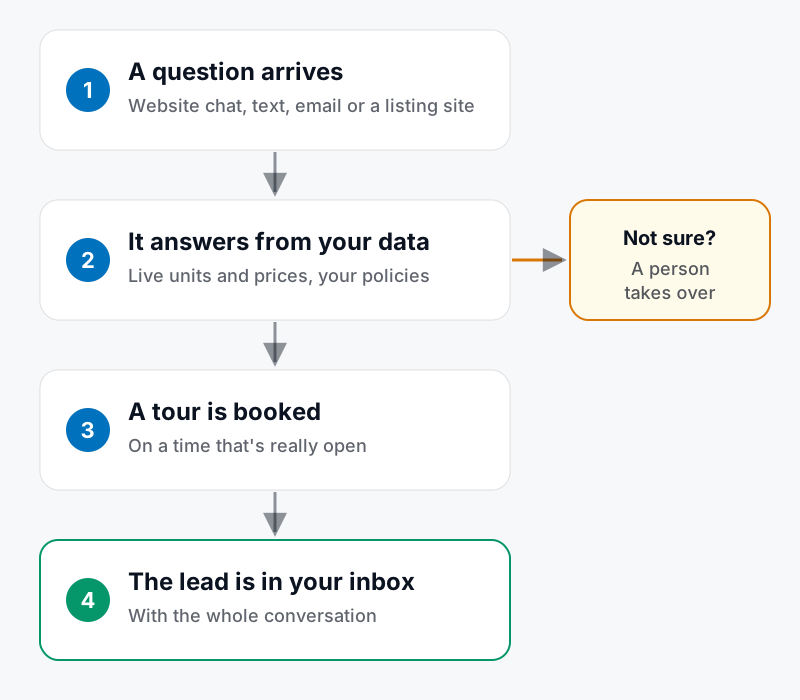
From question to booked tour, with a person taking over whenever the chatbot isn't sure.
What it should handle, and when it should hand off
A good rule: the chatbot handles questions with a factual answer in your data, and people handle anything that needs judgment.
Hand these to the chatbot:
- "What's available in a two-bedroom under $2,000?"
- "Do you allow cats? Is there a pet fee?"
- "Is parking included?"
- "Can I see it Saturday?"
- "Where do I apply?"
Hand these to a person:
- Anything that needs approval: an exception, a second parking spot, a different lease length.
- Lease changes, disputes and anything urgent.
- Anything outside the rules you've set.
- Any time the prospect asks for a person.
When the handoff happens, it should happen in the same conversation. The agent sees everything already said, and the prospect doesn't repeat themselves.
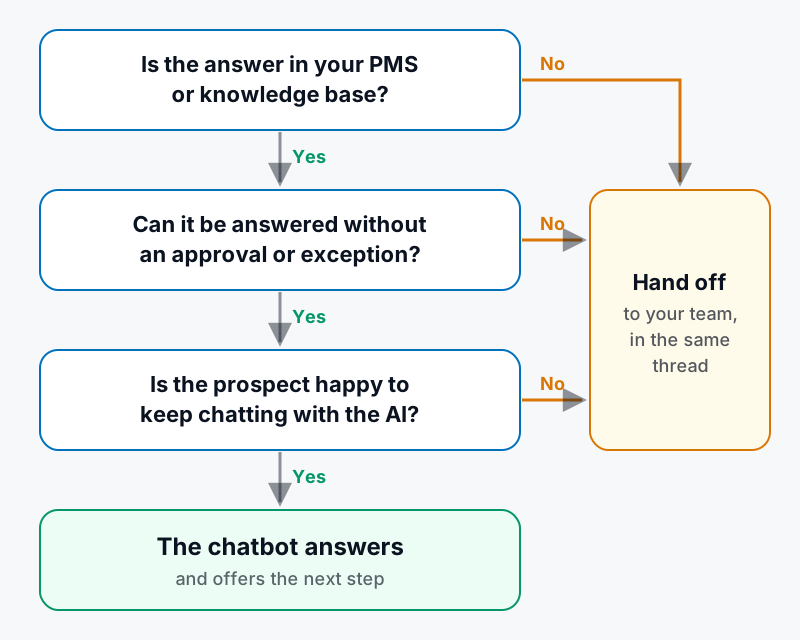
Three checks decide whether the chatbot answers or a person takes over.
Fair Housing applies to every chatbot reply
In the U.S., the Fair Housing Act makes it unlawful to make or publish any statement about renting a dwelling that indicates a preference, limitation or discrimination based on race, color, religion, sex, handicap (disability), familial status or national origin (42 U.S.C. § 3604(c)). A chatbot's replies are statements your company makes to prospects, so the same care you expect from your leasing agents applies to them.
In practice, a Fair Housing–safe apartment chatbot:
- Describes the home, not who it suits. "The unit is on the third floor with elevator access" is a description. "This is perfect for young professionals" is a preference.
- Gives the same answers to everyone. Two prospects asking the same question about the same unit should get the same facts, prices and specials.
- Never steers. It doesn't push anyone toward or away from a property or neighborhood.
- Gets reviewed. Someone on your team reads a sample of transcripts regularly, the same way a manager would listen to calls.
Ask every vendor how their chatbot is instructed to follow these rules, and whether you can read the transcripts. This section is general information, not legal advice. Your counsel or fair housing trainer should review your setup.
How to evaluate an AI leasing assistant
Demos tend to show the easy questions. These are the questions that separate tools in day-to-day use:
- Does it read live availability from your PMS? Ask which systems it connects to, and how quickly a newly leased unit disappears from its answers.
- Who controls its knowledge? You should be able to edit policies and FAQs yourself, without filing a ticket.
- What happens when it doesn't know? Ask the demo chatbot something that isn't in its data, and watch whether it admits it or guesses.
- Does it book tours on real calendars? A link to a booking page is not the same as a confirmed time on an agent's calendar.
- Does it cover all your channels? Many leads arrive as listing-site guest cards, texts and emails, not just website chats. One thread per prospect across channels prevents duplicate follow-up.
- How does your team take over? Look for live takeover from a shared inbox, where the AI pauses automatically.
- Does it work for more than one property? With a portfolio, the chatbot needs to know which property a question is about, or to ask.
- How does it handle Fair Housing and opt-outs? Ask to see the rules it follows, and confirm that "STOP" and unsubscribe requests are honored everywhere.
- What will you be able to measure? Conversations, leads, tours booked and the most common questions should be visible by property.
Rolling out a chatbot: an 8-day plan
The following is a hypothetical plan for a portfolio adding its first AI leasing chatbot. Adjust the pace to your team.
- Days 1–2: clean the data. Make sure unit availability, prices and specials in your PMS are current. A chatbot repeats whatever is there.
- Days 3–4: build the knowledge base. Gather your lease, addenda and policy documents. With LOFTx.ai, the AI drafts answers to the questions renters ask most, such as pets, parking, fees, utilities and application steps, and your team reviews each one for correctness.
- Days 5–6: launch on one property. Have the team read every conversation, and note wrong answers and missed handoffs.
- Days 7–8: tune and expand. Fix the gaps, confirm the handoff rules, then add the next properties.
What to watch from day one:
- how fast leads get a first reply
- how many conversations become tours
- tours booked outside office hours
- which questions get handed off most often
The handed-off questions are usually your next knowledge-base entries.
How LOFTx.ai approaches the property management chatbot
At LOFTx.ai, Lofti is the AI leasing assistant behind our website chat. It works the way this guide recommends:
- Answers come from your data. Units, prices, specials and availability come from your PMS (AppFolio and Rent Manager). Policies, fees and FAQs come from a knowledge base you control. If Lofti doesn't know something, it says so and hands the question to your team.
- Tours are real bookings. Visitors book on times that are really open on your leasing agents' Google Calendars, and can start applications without leaving your site.
- One inbox for every channel. Website chats, texts, emails, phone calls and listing-site guest cards all land in the Prospect Inbox. Your team can take over any conversation live, and Lofti pauses.
- Fair Housing rules in every reply. Lofti describes the home, never who it suits, and never steers.
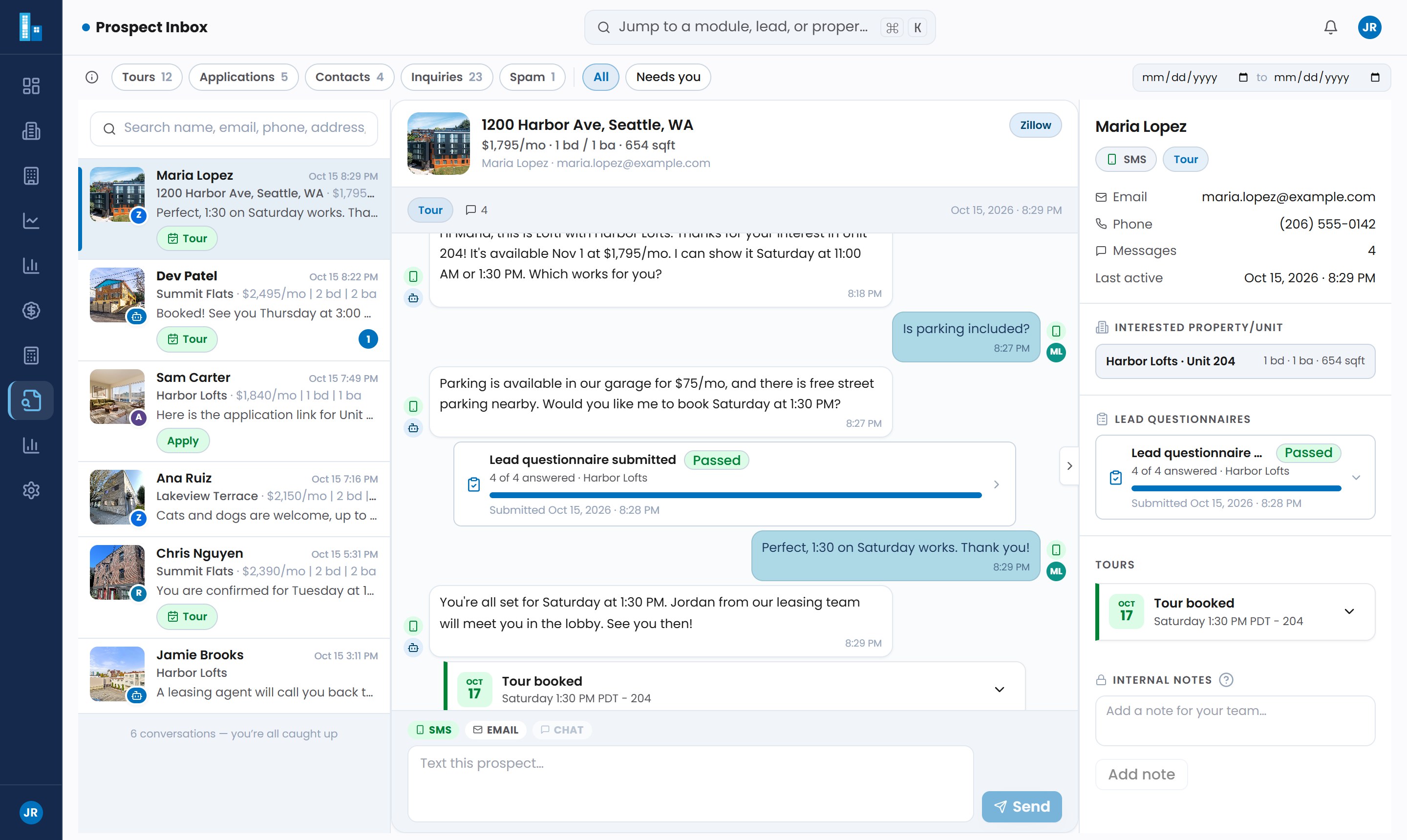
The Prospect Inbox: every conversation, tour and handoff in one place. Shown with sample data.
For the after-hours side of this, see after-hours leasing. For more on why a chatbot matters to the rest of your marketing, read why every property management website needs a chatbot.
Frequently asked questions
Will a chatbot replace our leasing agents?
No, and it shouldn't try to. A chatbot takes the repetitive questions and the after-hours inquiries, so your agents spend their time on tours, applications and the conversations that need judgment.
Does a chatbot make sense for single-family rentals?
Yes. LOFTx.ai supports single-family rentals and the property management companies that manage them, as well as multifamily and mixed portfolios. With scattered homes, answers stay specific to the home a renter is asking about, with tour booking and a clear handoff to your team. See our single-family rental guide.
How long does it take to set up?
It depends mostly on your data. If your PMS is current and your common answers are written down, the technical setup is usually the shorter part. For a website chatbot, that can mean adding one script tag to your site. Writing and checking the knowledge base takes longer.
Should a chatbot handle resident maintenance requests too?
It can, but resident service is a separate job with separate rules, such as emergency routing and work-order systems. If you need both, evaluate each side on its own rather than assuming a leasing chatbot covers maintenance.
See it on your properties
For a focused comparison, start with live chat versus a chatbot, website chat versus ChatGPT, or the small-team guide. Each addresses a different buying decision.
Choose your next leasing tool with a real workflow in mind. Try the live demo, then book a demo to discuss your PMS, tour calendars and handoff requirements. Review pricing and value before comparing quotes.
Explore the LOFTx property management chatbot
See how LOFTx brings website chat, lead capture and tour workflows together for property management companies, with supporting guides and consistent vendor comparisons.